Interview Templates: A Practical Guide for Hiring Teams
On this page
- An interview template is a structure, not a script
- Build an interview template around evidence and time
- Choose fewer questions you can explore properly
- Adapt a technical interview template to the role
- Frontend: explain the user's experience
- Backend: follow a request through failure
- Fullstack: connect both sides of a change
- Lead: explain decisions and responsibility
- Start with sample questions, then make the selection yours
- Share the interview template with the team
- Improve the template through a manual review
- Build one useful template before expanding the library
An interview template gives your hiring team a shared starting point. Without one, a frontend candidate might discuss accessibility with one interviewer and obscure JavaScript trivia with another. Both interviews produce a score, but those scores describe different evidence. Before the next round, agree what the role requires and which questions will help you see it.
TL;DR: Build a reusable structure around role criteria, ordered questions and a realistic agenda. Treat the role examples and time budgets below as suggestions, check publication permissions before sharing, and improve the template through a manual review of interview evidence.
An interview template is a structure, not a script
A useful template connects each core question to something the person will need to do at work. It also tells the interviewer what a useful answer would demonstrate and where clarification may be needed. You can keep the conversation natural while preserving the agreed questions and evaluation criteria.
The U.S. Office of Personnel Management's Structured Interviews: A Practical Guide (September 2008) describes consistent questions, question order and common rating standards as elements of a structured interview. That is guidance for federal hiring, rather than a promised result from using a template.
- Keep a shared core. Agree the main questions and acceptable follow-up prompts before meeting candidates for the same role.
- Ask for clarification. Invite the candidate to explain their reasoning without supplying the answer or introducing an unrelated challenge.
- Record missing evidence. A question you did not reach is a gap to address, rather than evidence that the candidate lacks the skill.
Key takeaway: A template should guide what you investigate and how you judge the evidence. Reading every transition word for word is a separate choice, not the purpose of the structure.
For the wider process, including conducting and reviewing the interview, use the structured technical interviews guide. This article concentrates on building and maintaining the template itself.
Build an interview template around evidence and time
Start with the hiring decision, then choose questions. For a frontend role, “can make an interface usable when requests fail” is more actionable than “knows frontend.” Ask the candidate to explain a relevant scenario and decide in advance which observations would support that criterion.
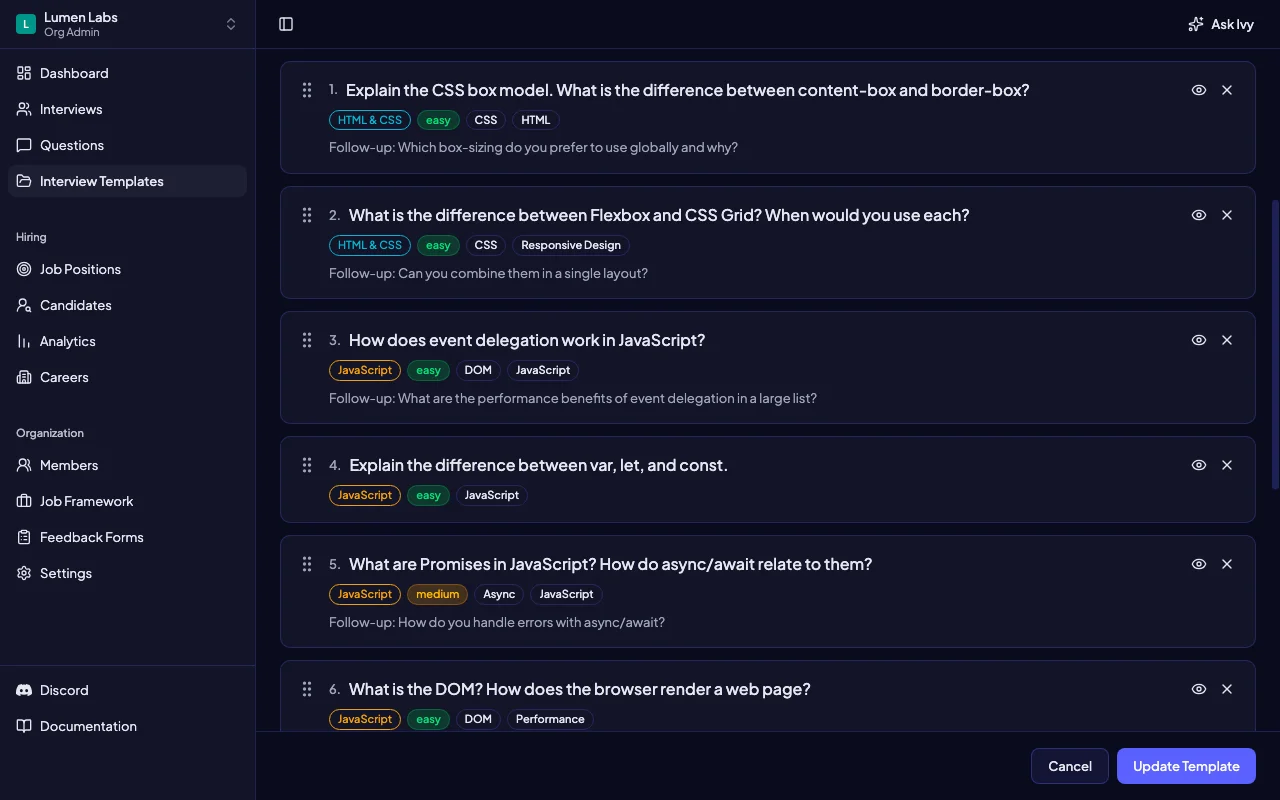
In Intervy, members with the appropriate template permissions can name and describe a template, select questions from the library, drag them into order and save. Selecting that saved template when starting an interview supplies its starting question sequence. The interview template builder lets you arrange the questions; the agenda below is a suggested manual plan.
Choose fewer questions you can explore properly
- Write the evidence target. For each question, note what you want to understand: a decision, the reasoning behind it, or how the candidate checks the result.
- Prepare an answer guide. Describe useful reasoning and acceptable alternatives, then agree how to record the evidence. Our candidate scoring rubric guide explains how to connect that evidence to ratings.
- Order for a conversation. Begin with an accessible explanation, move into a work scenario, then test a trade-off or changed constraint.
- Leave room for the candidate. Reserve time for their questions and explain what happens next.
For an illustrative 60-minute technical interview, try this budget:
- Opening — 5 minutes. Explain the agenda and give the candidate context.
- Foundations — 10 minutes. Establish the concepts needed for the main problem.
- Work scenario — 25 minutes. Explore an example, decisions and checks in depth.
- Trade-offs — 10 minutes. Change one constraint and ask how the approach would adapt.
- Candidate questions and close — 10 minutes. Protect this time rather than filling it with another technical prompt.
Tip: Rehearse the agenda with a colleague. If the scenario consumes the whole session, shorten it or remove a question before asking candidates to complete it. These timings are recommendations, not automatic question timers or dedicated time blocks in the template builder.
Adapt a technical interview template to the role
The following structures are illustrative editorial examples for a fictional team, Lumen Labs. They are not a claim that four matching templates come preloaded in Intervy, and the budgets are not hiring benchmarks. Each example totals 60 minutes, including a 5-minute opening and 10-minute candidate close.
Frontend: explain the user's experience
- Core sequence — 10 + 25 + 10 minutes. Discuss interface fundamentals, work through a delayed search-results scenario, then introduce a failure or accessibility constraint.
- Evidence to seek. Ask how keyboard users understand loading, empty and error states, and how the candidate would check their proposed behaviour.
For example: “Results arrive after the person changes their search. What should the interface show, and how would you verify it?” Select relevant questions from the React examples, JavaScript examples or Angular examples to fit your actual stack.
Backend: follow a request through failure
- Core sequence — 10 + 20 + 15 minutes. Establish data and API fundamentals, investigate a repeated request, then discuss recovery and operational trade-offs.
- Evidence to seek. Look for reasoning about correctness, retries, duplicate work and how the candidate would detect an incomplete operation.
Use one bounded situation, such as an order request whose response is lost. Ask what may have happened and how the system could handle a retry. Avoid turning the discussion into a checklist of technologies.
Fullstack: connect both sides of a change
- Core sequence — 10 + 25 + 10 minutes. Clarify the user need, trace a form submission from interface to persistence, then change a response or validation constraint.
- Evidence to seek. Ask where validation belongs, what the person sees after failure, and how the candidate would check that the interface and API agree.
A useful prompt is: “The form reports failure, but the record exists. What would you investigate before changing either side?” Keep the discussion focused on a complete user action rather than two unrelated frontend and backend quizzes.
Lead: explain decisions and responsibility
- Core sequence — 10 + 20 + 15 minutes. Clarify a delivery goal, explore a technical change involving several people, then introduce disagreement or a new constraint.
- Evidence to seek. Ask who makes the decision, which trade-offs need explaining, and what would justify changing course.
For example: “Two teams depend on an interface you need to change. How would you agree the transition and decide whether it worked?” Adjust the expected scope to the lead role you are hiring for.
Key takeaway: Change the evidence target when the role changes. Keep a comparable core for candidates applying to the same role, instead of choosing a different example midway through each interview.
Start with sample questions, then make the selection yours
Intervy includes existing sample question sets, including Frontend Developer and Backend Developer, with questions and included interview templates you can adapt. With the required question editing and publishing permissions, use Export / Import to choose a sample set. Treat its selection as a starting point for the role criteria you have agreed.
- Inspect before adding. Read the questions and included template rather than assuming the sample matches your seniority, stack or interview length.
- Trim the selection. Keep the questions that support this round's decision and arrange them in your intended sequence.
- Check before reloading. A sample import can update an existing template with the same name. Do not use repeated imports as a way to preserve a working version.
Tip: A new template added by a sample import starts with a Personal label. That label describes ownership and publication status; it is not a promise that teammates with view access cannot see it.
Share the interview template with the team
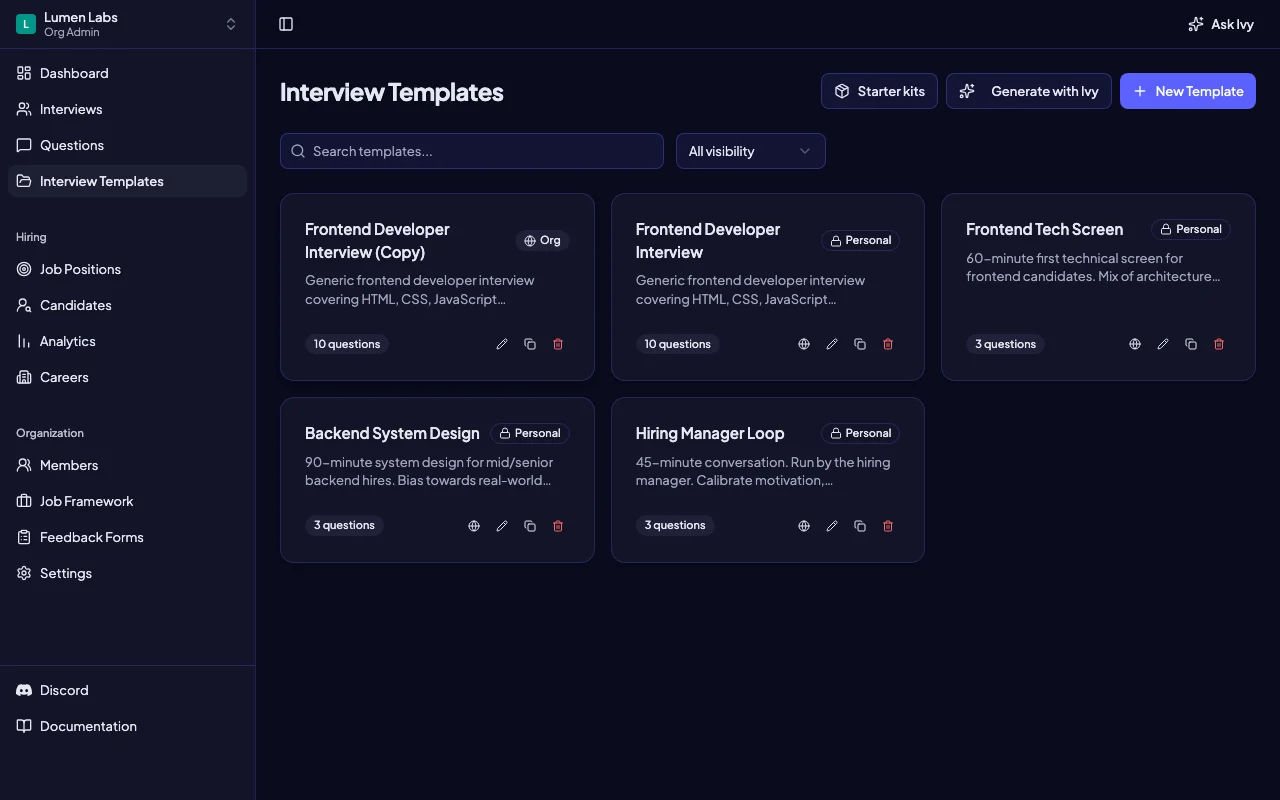
Agree which template the team should use before the next interviews. In Intervy, a member with template publishing permission can choose Publish to org on a Personal template. Publication is immediate if that member also has template approval permission; otherwise it creates a pending request for another permitted approver to review.
- Check permissions. Publishing and approving templates are distinct permissions. Do not assume that every team member can perform either action.
- Check the status. A pending request still needs review; an Org label identifies the published template.
- Check the questions too. Publishing a template does not publish its individual questions. Their publication status remains separate.
Key takeaway: Make team agreement explicit. A published template identifies a shared selection, but your team still needs to agree when to use it and what evidence the interviewer should record.
Improve the template through a manual review
After using the template, review interview notes with the interviewers. Separate a candidate's answer from problems in the question or agenda. If several conversations needed the same clarification, inspect that wording before concluding that every candidate missed the same skill.
- Assign a maintainer. Choose who collects observations and proposes the next revision.
- Record the reason. Keep a manual change log stating the question, the observed problem and the change you want to try.
- Agree the shared edit. Someone with template editing permission can edit an Org template directly. Saving changes that shared entry immediately; it does not start another publication approval.
- Name variants clearly. To develop a separate variant, use Clone to personal on an Org template and give the copy a distinct name. Publishing the copy adds another Org template rather than replacing the original.
- Remember linked questions. Copies reuse the same library questions. Editing a shared question's content can affect both templates, so agree those changes with the team as well.
For example, the fictional Lumen Labs team might replace a vague frontend prompt with a specific loading-and-error scenario, then review the next interviews' notes for whether the intended reasoning was actually discussed. That is a suggested human review process, not automatic template optimization.
Tip: Review after the first few uses and whenever the role changes. Make one explainable revision at a time, and tell interviewers which template to select for future interviews.
Build one useful template before expanding the library
Choose a role you are actively hiring for and agree the evidence you need from one round. A structured interview tool can hold the question selection; your team supplies the criteria, suggested agenda and maintenance decisions.
- Prepare one round. Select the core questions and rehearse the timing.
- Agree its use. Confirm publication status, who can edit it and which template interviewers should select.
- Review what happened. Use the recorded evidence to decide what to keep, clarify or remove.
Key takeaway: Start with a template your team understands and can maintain. Expand when another role or round needs a different evidence target.
Open Intervy to build your first interview template, or return to the structured technical interviews guide to place it in the wider hiring process.