Mobile Interview Questions for Real App Engineering
On this page
- Choose mobile interview questions around the role
- Mobile interview questions with answers and follow-ups
- 1. Two phones edit the same offline checklist. What happens when they reconnect?
- 2. A submission times out after the server saves it. Should the app retry?
- 3. A user leaves halfway through a form and the app process is later killed. What should return?
- 4. An upload is interrupted when the user backgrounds the app. How do you recover?
- 5. A feed feels slow on a train but fast in the office. Where do you start?
- 6. A new feature drains battery overnight. How would you isolate the cause?
- 7. Your app caches sensitive records for offline use. What would you keep locally?
- 8. The user denies location permission during checkout. What should the app do?
- 9. Crashes rise during a staged release. Do you stop the rollout?
- 10. A crash report points to your code but you cannot reproduce it. What next?
- Check platform detail against the actual constraint
- Score evidence at the level you are hiring
- Bring the bank into your next interview
Good mobile interview questions start where the happy path ends: a commuter loses signal, the operating system interrupts an upload, or a release crashes on a device your team rarely uses. Use these scenarios as a shared core for iOS and Android hiring, with platform probes matched to the role.
TL;DR: Use the ten scenarios below as a menu, choose the same core prompts for comparable candidates, and score recovery behavior alongside implementation detail. Separate shared engineering judgment from platform knowledge; the sample answers are signals to explore, not scripts to memorize.
Choose mobile interview questions around the role
Agree on the role’s platform, supported devices and level before choosing prompts. A native specialist should go deeper on their own platform. Do not make knowledge of both platforms an unstated requirement.
- Pick a compact core. Try an offline scenario, an interruption scenario and an incident scenario, then add a platform probe relevant to the job. This is a suggested design, not a validated threshold.
- Keep the conditions stable. Tell every candidate which behavior must survive interruption and what server support exists. Add the same follow-up before comparing answers.
- Record reasoning. Capture the failure mode, proposed recovery and test evidence. A structured interview tool can organize material; keep the hiring judgment with the panel.
Tip: Ask “what would the user see next?” For interview design, use our structured technical interviews guide.
Mobile interview questions with answers and follow-ups
These fictional situations have proposed answer signals. Accept alternatives that preserve the behavior and explain its limits.
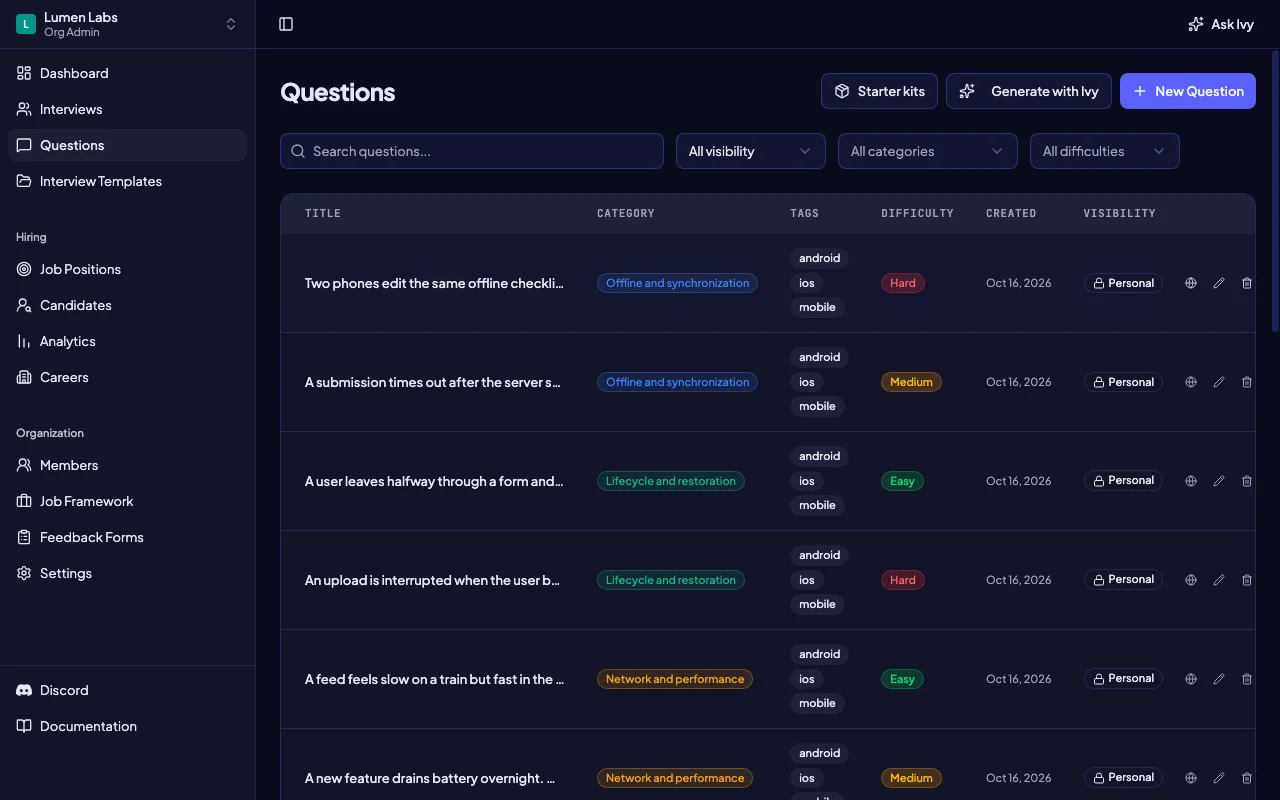
Tip: Read the question first, then reveal its follow-up. Avoid teaching the reference answer before assessing the candidate’s reasoning.
1. Two phones edit the same offline checklist. What happens when they reconnect?
- Answer signals (hard). Start by defining what a conflict means: independent checkmarks may merge, but competing edits to the same note need a product decision. Persist local edits and pending operations together; preserve stable operation identities and the last acknowledged server version. Reconcile against the server, expose unresolved conflicts, and avoid silently discarding either user’s work.
- Follow-up probe. What if one phone deletes an item while the other edits it?
- Platform depth. Ask how background scheduling changes the timing on their chosen platform; require correctness even if synchronization waits until the next foreground session.
2. A submission times out after the server saves it. Should the app retry?
- Answer signals (medium). Treat the outcome as unknown, not failed. Retry the same logical operation with a stable identity that the server deduplicates, then reconcile its status. Show pending versus confirmed clearly. Bound retries with backoff and jitter; do not create a new identity for each attempt.
- Follow-up probe. How would you prove one submission survives a lost response and an app restart?
- Platform depth. On iOS or Android, ask where the pending operation lives across process death; a network callback alone is insufficient.
3. A user leaves halfway through a form and the app process is later killed. What should return?
- Answer signals (easy). Separate durable draft content from small navigation or view state. Save drafts incrementally rather than waiting for a final lifecycle callback; restore the correct account’s draft and reconcile stale server data. Explain which state intentionally resets, and test interruption during a save.
- Follow-up probe. How would your test differ between rotating the screen and losing the whole process?
- Platform depth. Android: distinguish ViewModel survival of configuration changes from saved state and persistent storage after process death. UIKit: distinguish scene state restoration from durable business data.
4. An upload is interrupted when the user backgrounds the app. How do you recover?
- Answer signals (hard). Persist the upload’s identity, source reference and progress needed for recovery. Use platform-supported background transfer or scheduled work where appropriate, with resumable server behavior. Reconcile on return, tolerate cancellation and expired authorization, and show the user whether the upload is pending or complete. Do not promise immediate background execution.
- Follow-up probe. What happens if the source file disappears or the account changes before resuming?
- Platform depth. iOS: discuss background URLSession for suitable transfers and its constraints. Android: discuss WorkManager for suitable deferrable work and constraints, rather than an immortal service.
5. A feed feels slow on a train but fast in the office. Where do you start?
- Answer signals (easy). Reproduce on a real device with constrained latency, loss and bandwidth. Measure request timing, payload size, decoding and main-thread rendering separately. Show useful cached content and an honest stale indicator; cancel obsolete requests and make a deliberate pagination or image-sizing change only after identifying the bottleneck.
- Follow-up probe. What evidence would show the server is fast but the screen is still blocked?
- Platform depth. Ask the candidate to name a trace they would collect with Instruments or Android profiling tools, then explain what result would change their hypothesis.
6. A new feature drains battery overnight. How would you isolate the cause?
- Answer signals (medium). Compare affected and unaffected builds under controlled device, network and account conditions. Inspect repeated requests, location sampling, wakeups, background work and CPU activity. Tie a suspected cause to a measured trace, reduce unnecessary work or batch it, and rerun the same workload while checking freshness and responsiveness.
- Follow-up probe. What if reducing refresh frequency saves power but violates the feature’s freshness promise?
- Platform depth. Ask how they would measure with platform energy or system tracing tools on representative devices, including background and low-power conditions.
7. Your app caches sensitive records for offline use. What would you keep locally?
- Answer signals (hard). Begin with a threat model and minimize the retained fields and lifetime. Separate credentials from cached content; use platform credential or key protection appropriately, and select file or database protection for the data itself. Review backups, logs, notifications and app-switcher snapshots. Define logout and account-switch behavior, including pending operations, without claiming encryption solves every risk.
- Follow-up probe. How do you prevent the next signed-in account from seeing the previous account’s cached records?
- Platform depth. iOS: explain Keychain versus file data protection. Android: explain Keystore-managed keys versus the encrypted data stored elsewhere; neither is a generic store for an entire offline database.
8. The user denies location permission during checkout. What should the app do?
- Answer signals (easy). Ask whether location is necessary for this action. Request the minimum access in context, accept denial, and offer manual address entry where feasible. Check current authorization before use, handle revocation or reduced accuracy, and avoid repeatedly prompting or preventing unrelated actions.
- Follow-up probe. How would you test denial followed by a permission change in system settings?
- Platform depth. Ask for the actual permission states on the supported OS versions. Do not assume iOS and Android expose identical choices or that foreground access permits background tracking.
9. Crashes rise during a staged release. Do you stop the rollout?
- Answer signals (medium). Assess user impact and the change in crash rate with its denominator; segment by build, OS, device and affected journey. Pause expansion when the agreed impact threshold is crossed or evidence is uncertain, preserve diagnostic artifacts, and compare with the prior build. Mitigate with a safe feature control if available or prepare a fixed build.
- Follow-up probe. What if the crash occurs before the app can fetch its remote configuration?
- Platform depth. Compare App Store phased release with Google Play staged rollout. Pausing does not remove installed builds; Apple still permits manual downloads during phased release.
10. A crash report points to your code but you cannot reproduce it. What next?
- Answer signals (medium). Verify that the report matches the shipped build and that symbols or mapping files match. Group by stack and environment, reconstruct the user journey with privacy-safe breadcrumbs, and form a falsifiable hypothesis about concurrency, memory or state. Reproduce under the relevant conditions, add a focused regression check and monitor the repaired cohort.
- Follow-up probe. What evidence would make you reject your first explanation?
- Platform depth. iOS: discuss symbolication with the matching dSYM. Android: discuss deobfuscation with the matching mapping file; distinguish crashes from ANRs when assessing impact.
Check platform detail against the actual constraint
Android’s Guide to app architecture separates data ownership from short-lived UI components; its offline-first guidance covers local data, queued work and conflict resolution.
- Lifecycle reference. Android’s Save UI states distinguishes configuration changes and process death. Apple’s Managing your app’s life cycle describes scene transitions and the need to adjust work as an app leaves the foreground.
- Permission reference. Android’s Request runtime permissions recommends contextual requests and graceful behavior after denial or revocation. In either platform interview, ask candidates to check supported OS behavior before committing to a permission flow.
- Evidence over certainty. For performance and release questions, reward a concrete measurement plan and a result that would disprove the candidate’s hypothesis. Naming a profiler or crash service alone does not establish diagnostic skill.
Key takeaway: Platform APIs are tools for meeting a user-visible promise. Strong answers explain what survives, what can be delayed, and what must be rechecked when the app returns.
Score evidence at the level you are hiring
Use the following as proposed calibration anchors. Rate judgment and platform depth separately; write “not observed” for anything unprobed. Question difficulty describes the prompt, not an automatic candidate seniority label.
| Rating | Shared engineering judgment | Relevant platform depth |
|---|---|---|
| 1 — incomplete | Misses data loss or duplicate effects; assumes uninterrupted work | Proposes a mechanism that cannot survive the stated interruption |
| 2 — developing | Identifies the risk but needs prompts to connect recovery and testing | Names a suitable mechanism but leaves its limits unexplained |
| 3 — independent | Connects persistence, recovery, user feedback and a decisive test | Explains the chosen mechanism’s lifecycle and OS constraints |
| 4 — leading | Also owns conflict policy, compatibility, observability and incident trade-offs | Anticipates platform-specific failure paths and validates assumptions on supported devices |
- Junior expectation. Look for recognition of risk, safe basic behavior and a sensible request for help. Do not require ownership of an entire synchronization protocol.
- Mid-level expectation. Look for an implementable recovery path, correct platform choices and a test that distinguishes success from a plausible failure.
- Senior expectation. Look for explicit product and server agreements, rollout compatibility, diagnostic evidence and decisions under incomplete information. More terminology does not raise the score.
Calibrate by independently scoring a fictional response. Our guide to scoring candidates fairly can guide an interview scoring tool or panel notes.
Tip: A strong conflict-resolution answer and weak platform restoration knowledge are different observations. Preserve that distinction in the debrief instead of averaging away a requirement the job needs.
Bring the bank into your next interview
The sample set contains the same ten prompts, answers and follow-ups. Choose a balanced subset for the role.
- Load the set. Open the Import section and select “Mobile Developer” in Sample Interview Data to load all 10 questions. Importing requires organization membership and permission to publish questions; ask your organization administrator if you need access.
- Keep the boundaries clear. The included interview template groups the questions. The scoring anchors above are guidance for your panel, not an automated hiring decision or a promise that the import creates a custom scoring form.
Key takeaway: Start with one repeatable interview, record observable evidence, and refine the probes after your panel compares its notes.