How to Write Interview Questions for Technical Roles
On this page
- How to write interview questions from a role requirement
- How to write interview questions with answer signals
- Repair trivia, gotchas, and ambiguous wording
- Adjust difficulty through constraints and reasoning
- Make Markdown and code questions readable
- Organize questions so the next interviewer can find them
- Use AI assistance for drafts, then review the result
- Review one question before adding more
Learning how to write interview questions starts with a decision: what do you need to learn about someone's ability to do this role? For a technical interview, turn that requirement into a bounded task, then decide what reasoning would count as useful evidence. A technical interview preparation tool can hold the result; your team still owns the question and the judgment.
TL;DR: Start with a role requirement, write a clear task with explicit constraints, and prepare reference-answer signals before using it. Revise trivia and gotchas, adjust the reasoning expected at each level, and review any AI draft yourself before saving it.
How to write interview questions from a role requirement
Choose a task the person will actually need to handle. Replace a broad trait such as “strong backend skills” with an observable action: “investigates a slow request using evidence before proposing a change.” That gives the question a purpose beyond checking familiar terminology.
The U.S. Office of Personnel Management's Structured Interviews guidance describes assessing job-related competencies with predetermined questions and common answer standards. The workflow below is our editorial approach to applying that principle to technical question writing, rather than a validated assessment instrument.
- Name the evidence goal. Write one sentence describing what you want to observe, such as choosing a measurement that separates competing explanations.
- Bound the task. State the system, symptoms, available information, and what the candidate should produce: an explanation, investigation plan, or small implementation.
- Set the working conditions. Say whether reference material is allowed, what assumptions can be made, and how much time you suggest spending.
- Choose the question type. Use an explanation, debugging exercise, or design discussion to serve that goal. The complete guide to technical interview questions covers the broader choice of question types.
Tip: Ask a colleague to explain what the prompt is testing before showing them your answer notes. A different interpretation is a reason to revise the wording.
How to write interview questions with answer signals
Consider this fictional editorial example. Lumen Labs is hiring a backend engineer who will investigate service latency. These prompts and answer signals are illustrative writing advice, not a preloaded question set or a universal hiring standard.
Before: “How do you debug slow APIs?”
That leaves the interviewer to invent the setting during the conversation. One candidate might discuss database queries while another discusses deployment changes, without either knowing the intended task.
After: “A service endpoint usually responds within 200 milliseconds but now takes around two seconds. The change began after a deployment. You have request logs, application traces, and database timings, but no evidence yet of which part is slower. Describe the first observations you would collect and how each would help distinguish possible causes. Suggest a safe next action. Use about ten minutes; you do not need to write code.”
The numbers and time budget belong to this fictional scenario. Change them to match the task you intend to discuss.
- Reference-answer signals. Look for separating time spent in the application, database, and downstream calls; comparing affected requests with a useful baseline; and explaining what each observation would change.
- Acceptable alternatives. A candidate might begin with a trace or a release comparison. Record why either could be reasonable, rather than requiring your preferred sequence of words.
- Missing evidence. Distinguish a plausible hypothesis from an observation. “The database is slow” is not established just because the endpoint is slow.
- Neutral follow-up. Ask “What observation would make you reconsider that explanation?” to explore reasoning without revealing your preferred answer.
Key takeaway: Prepare answer signals alongside the prompt. A reference answer should help the interviewer recognize reasoning, including valid alternatives, rather than become a script the candidate must recite.
Repair trivia, gotchas, and ambiguous wording
When you create technical interview questions, review what an answer would actually tell you about the role. Keep precise knowledge checks when that knowledge is essential, but give them a clear purpose in the interview.
- Repair trivia. Replace “Name every cache eviction policy” with a workload and a decision: “Which eviction approach would you try for these access patterns, and what would you measure?” Assess the explanation you need, not an unrelated list.
- Repair gotchas. Replace “What obscure trick makes this code fail?” with “This code behaves differently from the author's intention. Explain the behavior and propose a clearer version.” Include the relevant language and version when they matter.
- Repair ambiguity. Replace “Make this scalable” with a stated workload, a resource constraint, and a requested deliverable. Say whether the candidate should sketch a design or implement one part.
Avoid adding hidden requirements after the candidate has committed to an approach. Write any planned follow-up constraints in your interviewer notes and use them consistently for the same interview task.
Tip: Read the question aloud. Remove stacked requests that test several unrelated skills at once, and make the main deliverable easy to identify.
Adjust difficulty through constraints and reasoning
Keep the evidence goal recognizable while changing how much support the task supplies and which trade-offs the answer must address. The following seniority distinctions are editorial suggestions for your team to calibrate, not automatic mappings to an app label.
- For an earlier-career discussion. Supply a small trace or a short list of observations. Ask the candidate to explain what it shows and propose one useful next check.
- For an experienced individual contributor. Let the candidate choose observations, compare hypotheses, and explain the limits of a proposed fix.
- For a senior discussion. Add competing operational constraints. Ask how they would reduce uncertainty, limit risk, and decide whether a rollback or further measurement is warranted.
Intervy's question editor offers Easy, Medium, and Hard labels. Treat those as your team's organizational labels; selecting Hard does not establish that a question is appropriate for every senior role. Record the intended role and expected reasoning in your question and answer notes.
Key takeaway: Increase the judgment required, not just the amount of obscure knowledge. Have interviewers try the variants and compare the evidence each one invites.
Make Markdown and code questions readable
In Intervy, Question Content and Example Answer are separate Markdown fields with a Preview control. Use short headings, emphasis, and lists to separate context, the task, and constraints. Keep the reference-answer discussion in Example Answer so you can edit it separately from the prompt.
For a code-based question, use a language-labelled code block in the Markdown editor and check its rendered preview. The example below shows a Python question in Preview. Formatting and highlighting help you inspect the presentation; they do not execute the code or validate its answer.
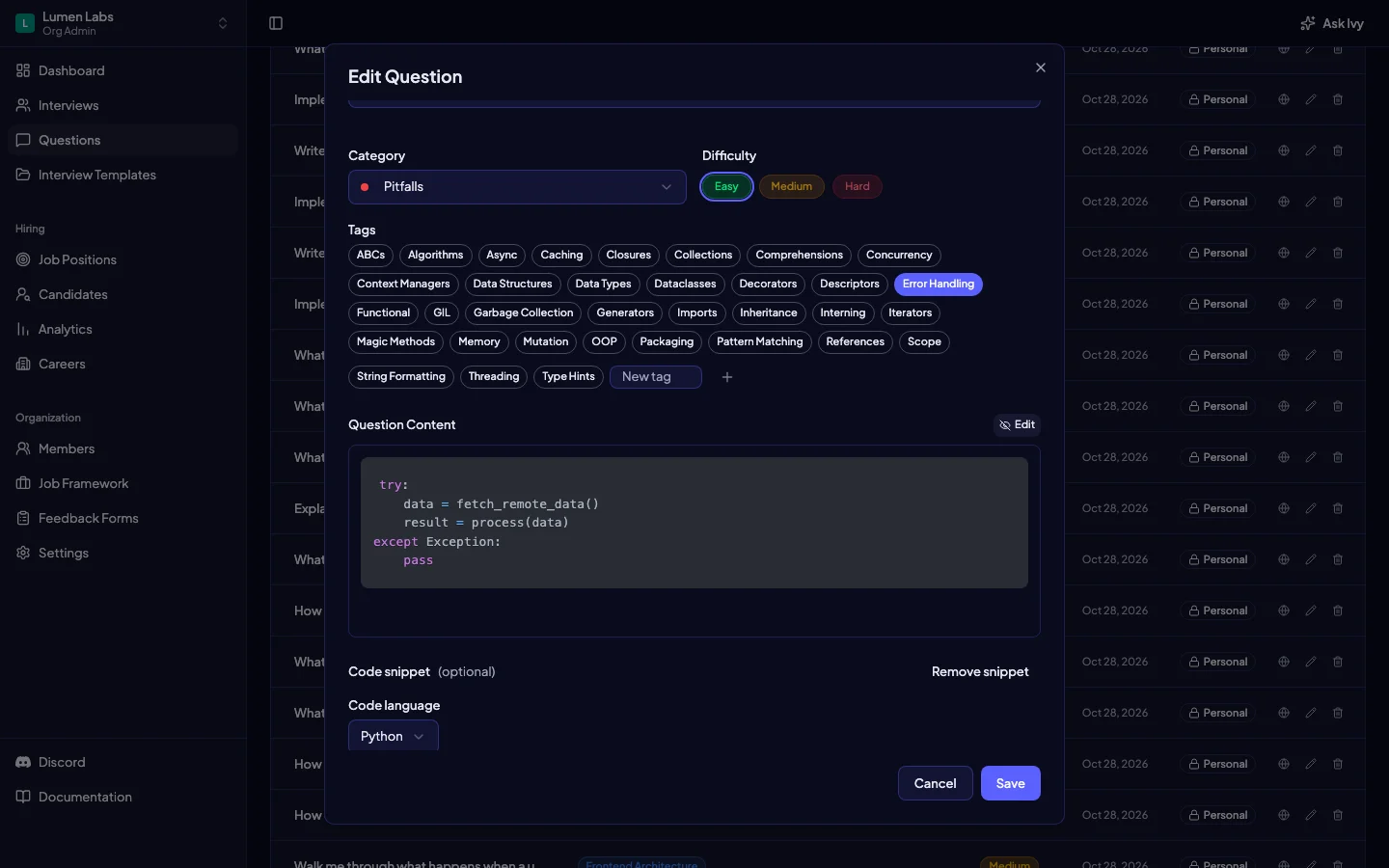
- Keep context close to code. Explain what the candidate should inspect, what behavior is intended, and whether they should describe or change it.
- Check the finished presentation. Confirm indentation, line breaks, and the surrounding instructions remain readable before saving.
Tip: Preview the reference answer too. Clear formatting should support an explanation, not hide missing assumptions behind a polished code sample.
Organize questions so the next interviewer can find them
Intervy lets you assign a category and multiple tags to a question, alongside its difficulty label. Its question list supports search and filters for category and difficulty. Use those controls to make a reviewed question findable in your interview preparation workflow.
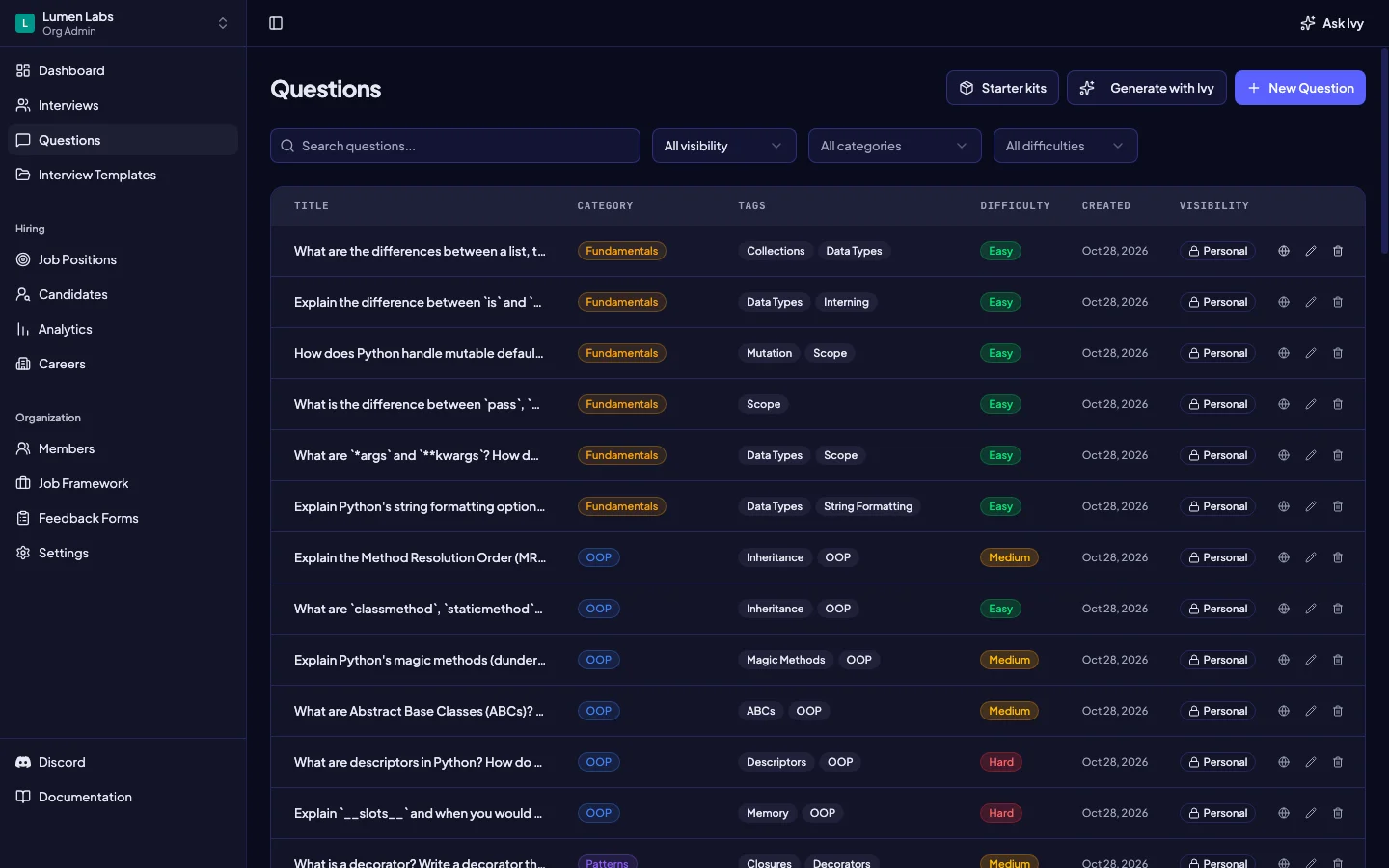
- Use a category for the main topic. For example, put the latency question under troubleshooting rather than inventing a category for each small variation.
- Use tags for useful cross-cutting distinctions. Agree a small vocabulary for subjects such as backend or observability, and reuse it consistently.
- Keep reuse deliberate. Save a reviewed question first. Sharing it in the organization question bank is a separate publication action, requiring publishing permission and, when applicable, approval; saving alone does not publish it there.
For the next step of arranging questions into an interview, use the interview templates manual. Keep the writing decision separate from the decision about which questions belong together.
Key takeaway: A clear prompt needs clear organization too. Choose labels another interviewer would recognize without your explanation.
Use AI assistance for drafts, then review the result
When AI assistance is available in Intervy, the question editor can generate Question Content or an Example Answer using the other populated question fields as context. Generation places text in the editable form; Save is a separate action and still requires question-editing permission. It does not automatically validate the question or publish it to the organization bank.
AI assistance depends on availability and your organization's AI setup. Credit-based generation requires organization AI credits, with usage affecting the charge. Bring your own key is available on Growth and above: your organization must select that provider and you must have its key saved. A visible generation control is not a guarantee that a request can complete.
Use AI-assisted variations and follow-up drafting as an editing exercise. Start from a copy of the wording you want to improve, give the drafting assistant the evidence goal and constraints, and ask for alternatives. Compare those suggestions yourself; field generation does not provide a dedicated, validated difficulty-variation workflow.
- Preserve the goal. Reject a variation that quietly changes the skill being assessed or supplies the answer in the question.
- Check correctness. Work through any code and verify the reference answer's assumptions, edge cases, and acceptable alternatives.
- Review follow-ups. Remove leading hints and surprise requirements. Keep the prompt respectful and relevant to the role.
- Save intentionally. Read and edit generated text before using Save. Keep your original wording somewhere you can compare while revising.
Tip: Resume-based prompts need the same review. The guide to generating interview questions from a CV covers that separate starting point.
Review one question before adding more
Use this final editorial checklist with a colleague before you reuse a question in interviews. A structured interview tool can organize the material, while your team remains responsible for its relevance and evaluation.
- Purpose. Can you name the role requirement and the evidence the answer should provide?
- Clarity. Are context, constraints, deliverable, and allowed assumptions explicit?
- Answer signals. Have you recorded useful reasoning, acceptable alternatives, and missing evidence?
- Level and presentation. Does the expected reasoning fit the role, and does the Markdown preview read clearly?
- Human review. Has someone checked any AI-written wording and reference answer before saving or sharing?
Start with one role requirement and revise one prompt together. When you are ready to organize the result, create an Intervy account.
Key takeaway: Write the evidence goal first, then the prompt and answer signals. Keep every later choice accountable to that goal.