AI-Assisted Interviews: A Practical Guide for Hiring Teams
On this page
- AI-Assisted Interviews in 2026: What's Real and What's Hype
- AI for Question Generation: Structured, Not Just Chat
- AI for CV Analysis Before the Interview
- AI Interview Summaries and Note-Taking (Coming Soon)
- The BYOK Approach: Why Your AI Keys Matter for Privacy
- What AI Should NOT Do in Interviews
- Getting Started with AI-Assisted Interviews
Every hiring team is being told that AI will transform interviewing. Some of that is true: AI-assisted interviews can take hours out of question writing and CV prep. Some of it is marketing: no model can tell you who to hire, and the tools that claim to are the ones regulators are watching. This guide separates the two and shows you how to use AI for technical interviews without handing it the decision.
TL;DR: Use AI to draft questions, digest CVs before the interview and organize your notes. Keep humans in charge of asking, scoring and deciding. Know where your candidate data goes, and use your own AI provider account if your security team needs control.
AI-Assisted Interviews in 2026: What's Real and What's Hype
AI in hiring now covers everything from writing job ads to "analyzing" video interviews. The useful part is narrower than the pitch decks suggest. AI is good at producing text from context: drafting questions, restructuring a messy resume, turning notes into a readable record. It is bad at judging people, and it can't tell you why it reached a conclusion.
That split gives you a simple rule for AI-assisted interviews: let AI prepare the material, and let people evaluate the candidate.
- Real: drafting role-specific questions with reference answers, so interviewers start from a solid bank instead of a blank page.
- Real: condensing a long CV into a structured, anonymized profile you can scan in two minutes.
- Real: drafting a summary from your own notes and scores, as long as a person reviews it.
- Hype: "fit scores," automated shortlists and emotion or tone analysis that claim to predict job performance.
- Hype: AI interviewers that replace the conversation instead of preparing you for it.
Key takeaway: The best AI for technical interviews makes your interviewers better prepared and more consistent. It does not replace their judgment.
AI for Question Generation: Structured, Not Just Chat
Pasting "give me 10 React questions" into a chatbot gets you a list. It doesn't get you a question bank. A question you can reuse across candidates needs a clear prompt the interviewer reads aloud, a reference answer describing what a strong response covers, a difficulty level, and a category, so you can build balanced interviews from it.
That's the gap a dedicated AI interview question generator closes. In Intervy, you ask Ivy, the built-in AI assistant, for what you need, in plain language. Ivy drafts each question with a title, the question text, a reference answer, a difficulty, a category and tags. Nothing goes into your library until you review it and click save.
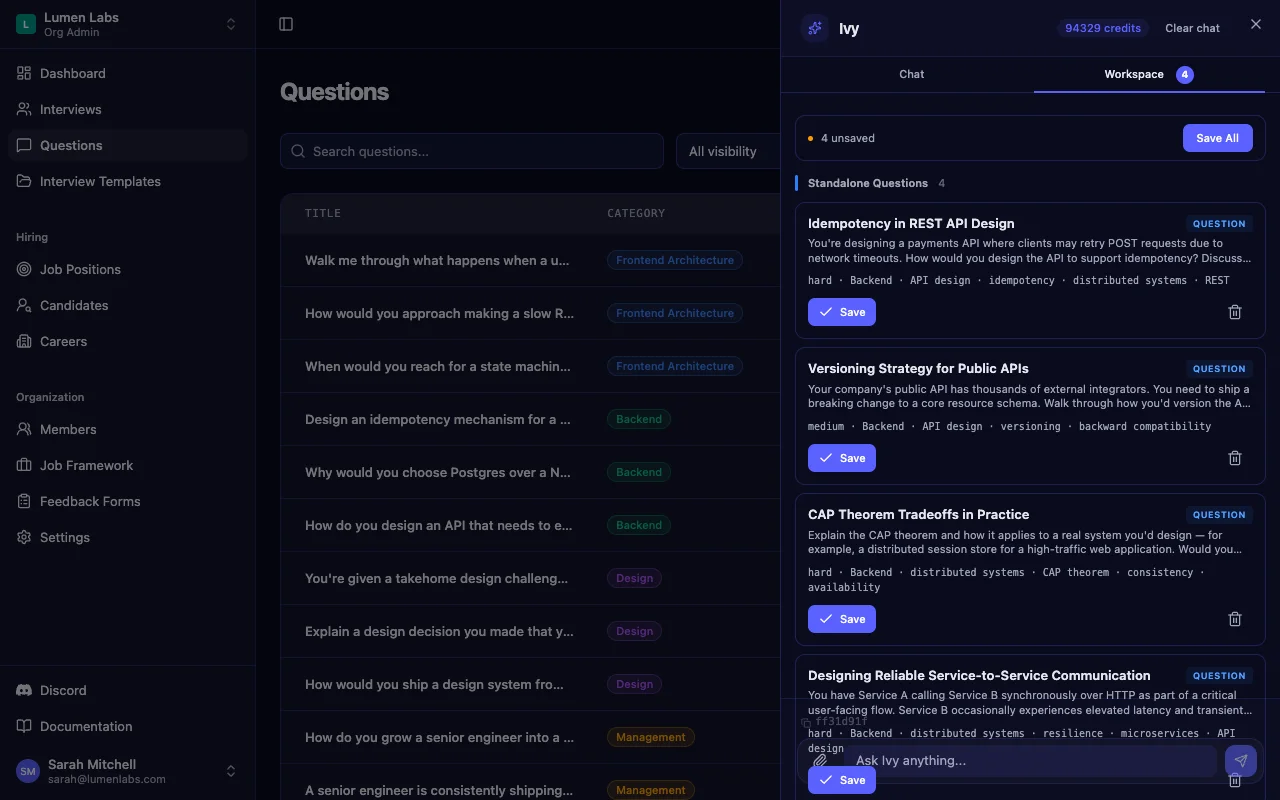
You can also use AI one field at a time: each part of the question editor has its own generate button, so you can write the question yourself and let AI draft the reference answer. For a full walkthrough of building a bank and templates this way, see AI interview preparation for technical interviews.
- Be specific in the prompt. Seniority, domain and focus ("senior backend, API design and distributed systems") produce far better drafts than "backend questions."
- Edit the reference answer. It's what makes scoring consistent across interviewers, so make it reflect your team's bar, not a generic one.
- Keep your categories consistent. Generated questions slot straight into the category structure described in our complete guide to technical interview questions.
Tip: Treat every AI-generated question as a draft from a junior colleague. It's a fast starting point, and it still needs a senior engineer's read before it goes in front of a candidate.
AI for CV Analysis Before the Interview
Most interviewers skim a CV five minutes before the call and then ask generic questions anyway. AI helps by doing the tedious part: pulling out what the candidate actually claims to have built, with which tools, over how long.
When you upload a CV (PDF or DOCX) to a candidate in Intervy, the AI extracts an anonymized profile: total experience, skills, education, languages, certifications, and each role with its responsibilities and technologies. Names and contact details are stripped, and employers are replaced with descriptions like "Fintech startup (Series B)." Reading about what someone did instead of where they did it removes one easy source of bias.
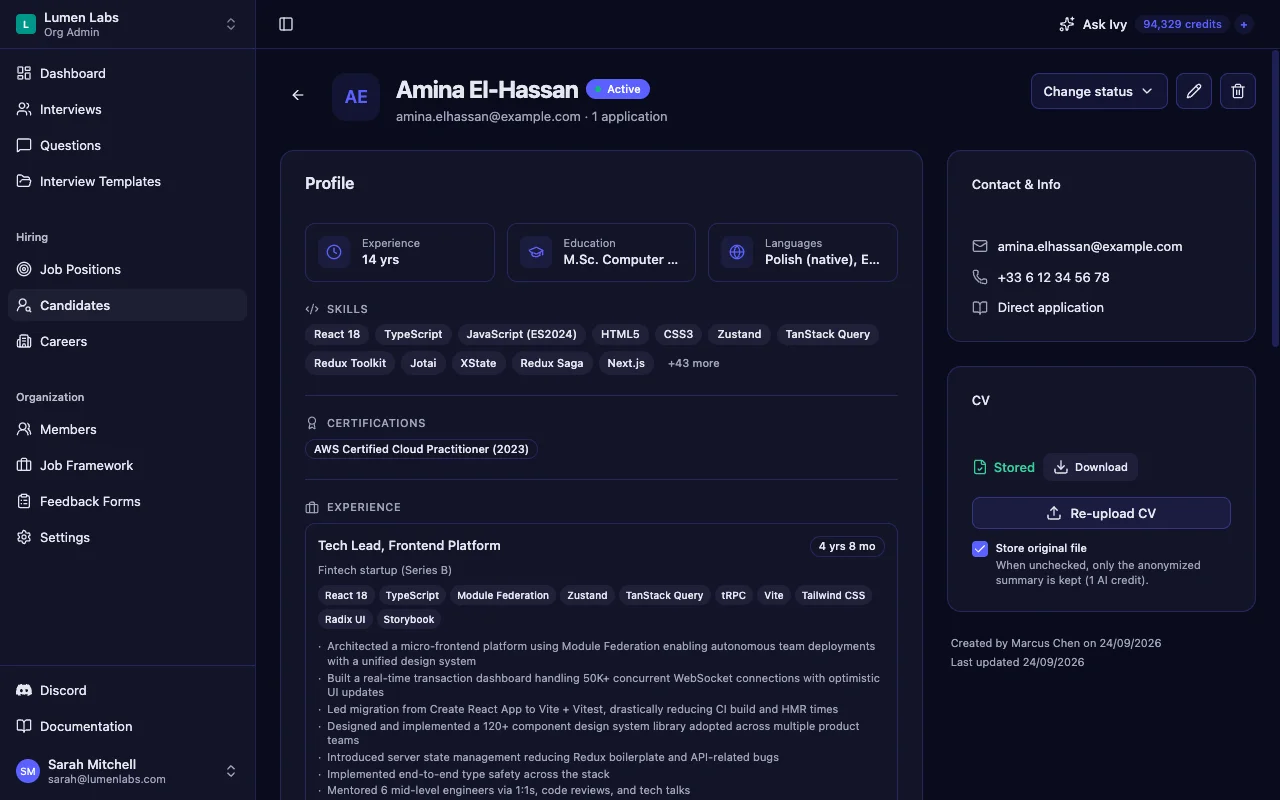
Be clear about what happens to the file. The CV is sent to the AI provider to be processed, and the anonymizing happens there. You then decide whether Intervy keeps the original file at all: untick "Store original file," and only the anonymized profile is kept.
- Use the profile to plan follow-ups. Pick two or three specific claims ("migrated to Vite," "mentored six engineers") and plan how to probe them.
- Generate CV-targeted questions. Attach the CV in an Ivy chat and it builds questions around those claims. Our guide to generating interview questions from a CV covers that workflow step by step.
- Don't treat the profile as a verdict. When Ivy summarizes an attached CV, it's instructed to report facts only, with no assessment of suitability and no hiring recommendation. Your interview is where the evaluation happens.
Key takeaway: CV analysis for interviews is prep work. It tells you what to ask about, not whether the candidate is good.
AI Interview Summaries and Note-Taking (Coming Soon)
The hour after an interview is where signal gets lost. Notes are half-finished, memories blur, and the debrief turns into whoever talks loudest. AI can help here by turning per-question scores and notes into a readable record while the interview is still fresh.
A factual AI summary for completed interviews is coming soon to Intervy. The principle behind it matters more than the feature: a good interview summary reports what was asked, the ratings given and the notes taken. It does not add a verdict the interviewers didn't reach.
- Summaries must come from your notes. An AI summary is only as good as the structured notes and ratings behind it. Score each question as you go, as described in our guide to structured technical interviews.
- No summary should say "hire." If a tool writes recommendations, interviewers start deferring to it, and your decision is no longer yours.
- Always review before sharing. Treat the summary as a draft of your record, not as the record itself.
Tip: Until summaries ship, capture a short comment next to every rating during the interview. That habit is what makes any summary, human or AI-written, worth reading.
The BYOK Approach: Why Your AI Keys Matter for Privacy
Every AI feature sends data somewhere. In hiring, that data is resumes, interview notes and evaluations of real people, so "which AI account does it go through?" is a fair question for your security team to ask.
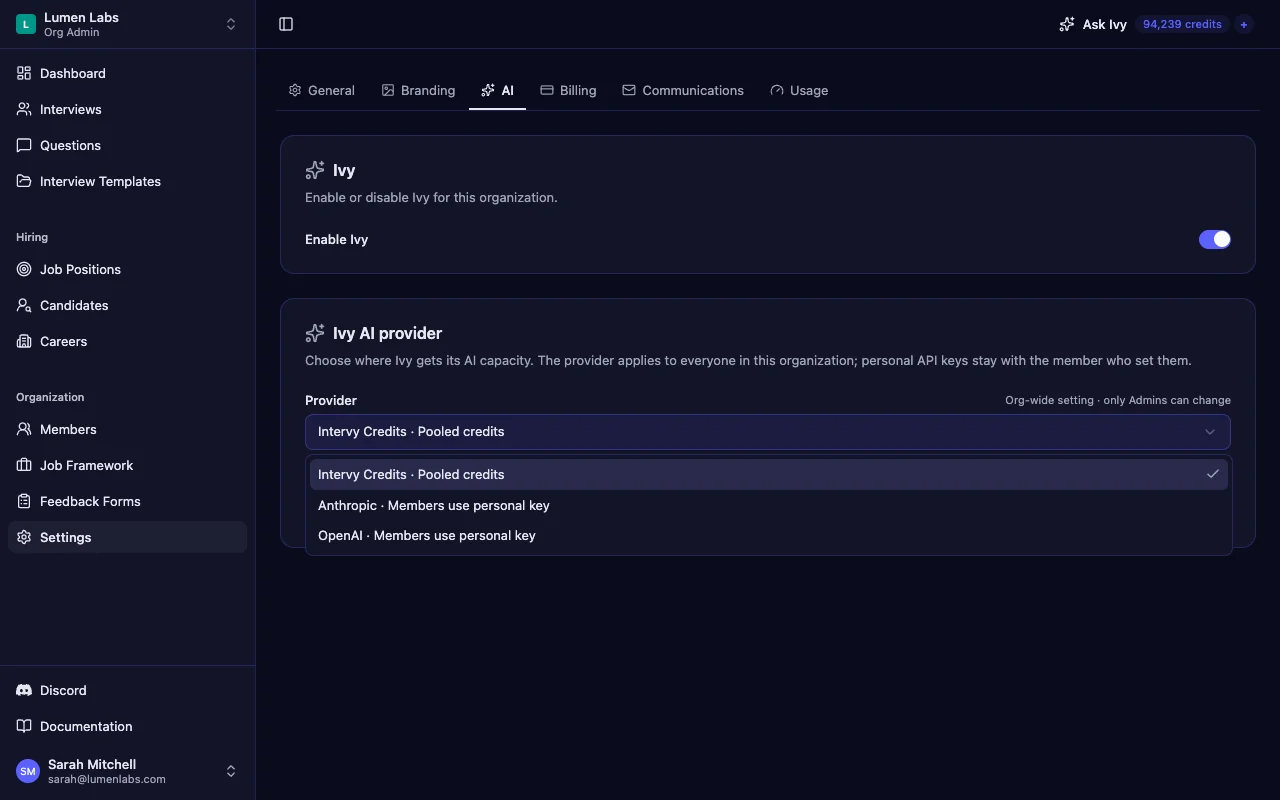
By default, Intervy's AI runs on pooled Intervy credits, through Intervy's own provider account. On Growth and Scale plans, you can bring your own AI key instead. An admin switches the organization's provider to Anthropic or OpenAI, and each member adds their own personal API key, which is stored encrypted. From then on, Ivy's calls go through your provider account, under the terms you have with that provider, and no Intervy credits are charged.
- You own the data path. AI requests run under your agreement with your provider, including any retention or regional terms you negotiated.
- Only admins can change the provider. It's an organization-wide setting, so a member can't silently reroute everyone's AI traffic.
- Billing moves to your provider. Usage is paid on your own AI account instead of Intervy credits.
For the full picture on billing and plan requirements, read Bring Your Own AI Key: Privacy & Control in AI Hiring.
Key takeaway: BYOK doesn't make AI private by magic. It puts the data path under a contract you control, which is usually what a security review needs to see.
What AI Should NOT Do in Interviews
The most important decisions in AI-assisted interviews are the ones you keep away from the AI. Hiring is a high-stakes decision about a person, and regulators treat it that way. The EU AI Act classifies AI used for recruitment and candidate evaluation as high-risk. New York City requires bias audits for automated employment decision tools.
- Don't let AI score or rank candidates. In Intervy, every rating comes from an interviewer, and the overall rating is simply the average of those ratings. No AI scoring, no ranking, no automated rejection.
- Don't analyze faces, voices or "tone." These signals have little proven link to job performance and can correlate with disability, age or accent.
- Don't screen out on CV keywords alone. A profile tells you what to ask about. It can't tell you what the candidate can do.
- Don't let AI write the decision. Recommendations belong to the people who ran the interview and can defend them.
- Don't hide AI from candidates. If AI touched their CV or your interview prep, be ready to say how.
Structure is your best defense against both human and AI bias. Asking every candidate the same core questions and scoring them against the same rubric gives you something to audit. Our guides on reducing bias in interviews and scoring candidates fairly go deeper.
Key takeaway: If you can't explain a hiring decision without saying "the AI said so," the AI made the decision. Redesign the process until that's no longer true.
Getting Started with AI-Assisted Interviews
You don't need an AI strategy document to start. Pick one role that's open now and add AI one step at a time, keeping a person in the loop at every step.
- Build the bank. Ask an AI interview question generator for role-specific questions, then edit the reference answers to match your bar.
- Lock the template. Put the reviewed questions into a structured interview template, so every candidate gets the same core interview.
- Prep from the CV. Before each interview, read the anonymized profile and plan two or three follow-ups on specific claims.
- Score live, decide together. Rate each answer during the interview, add a short comment, and make the decision in a debrief based on those scores.
- Settle the data question early. Decide with your security team whether platform credits are fine or whether you need your own AI key.
Tip: Run your first AI-assisted loop next to your existing process for one role. Compare interviewer prep time and how consistent the scores are before you roll it out wider.
Intervy is a structured interview tool that builds this workflow in: AI-drafted questions you review, anonymized CV profiles, live scoring, and the option to run AI on your own provider account. Explore the AI copilot, or start for free at app.intervy.ai and run your next technical interview with AI in a supporting role.